Closetboard for stylists
Your styling business, in one app.
Your clients’ closets, online bookings, your own website, reminders and takings, all in Closetboard on your iPhone or iPad. The admin runs itself, so your time goes on styling.
14 days free with every feature. Then from £35 a month. Cancel any time.

free
What you get
Everything a stylist juggles, in one place.
Most stylists run their business across Instagram messages, a calendar link, a spreadsheet and a folder of lookbook PDFs. Closetboard puts it in one app, with your clients on the other end of it.
Their closet, on your phone
Every piece a client owns, ready to style from wherever you are, with your notes, their colour analysis and a private chat beside it.
Find out more StylingLooks they’ll actually wear
Build outfits from their own clothes, send them to their phone in albums, and see which ones they love and wear.
Find out more Your pageYour own booking website
closetboard.app/@you: your work, your services and a Book button, ready for your Instagram bio.
Find out more ScheduleA diary that keeps itself
Your hours and rules, busy time and days off, synced with iPhone, Outlook and Google calendars.
Find out more MessagesReminders sent for you
Confirmations, day-before reminders and thank-yous go out in your words, on time.
Find out more BusinessTakings at a glance
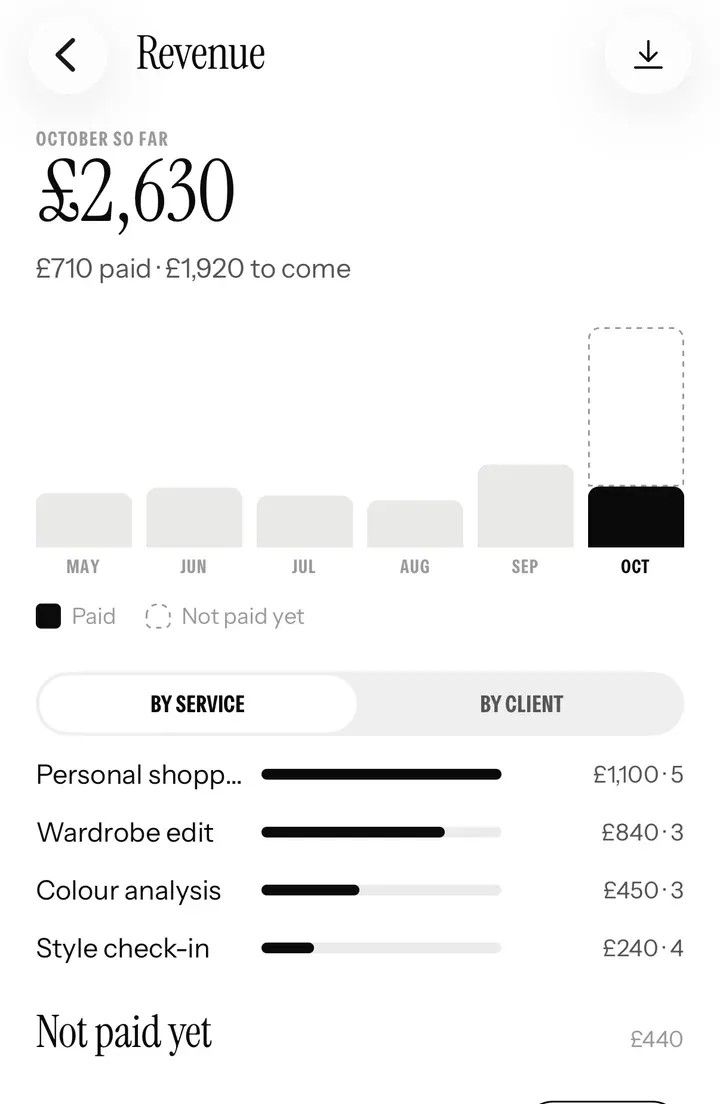
Revenue by month and service, what’s still unpaid, numbered invoices and a spreadsheet for your accountant.
Find out moreBefore and after
Less admin. More styling.
Before
- Booking by back-and-forth messages
- Asking clients to send photos of their clothes
- Lookbooks as PDFs nobody opens again
- Texting reminders the night before
- Invoices in a spreadsheet, payments in your head
With Closetboard
- Clients book themselves into your free times
- Their whole closet is already on your phone
- Looks land in their app, next to their clothes
- Reminders go out by themselves
- Every session tracked, invoiced and added up
Your clients
Every client’s closet, in your pocket.
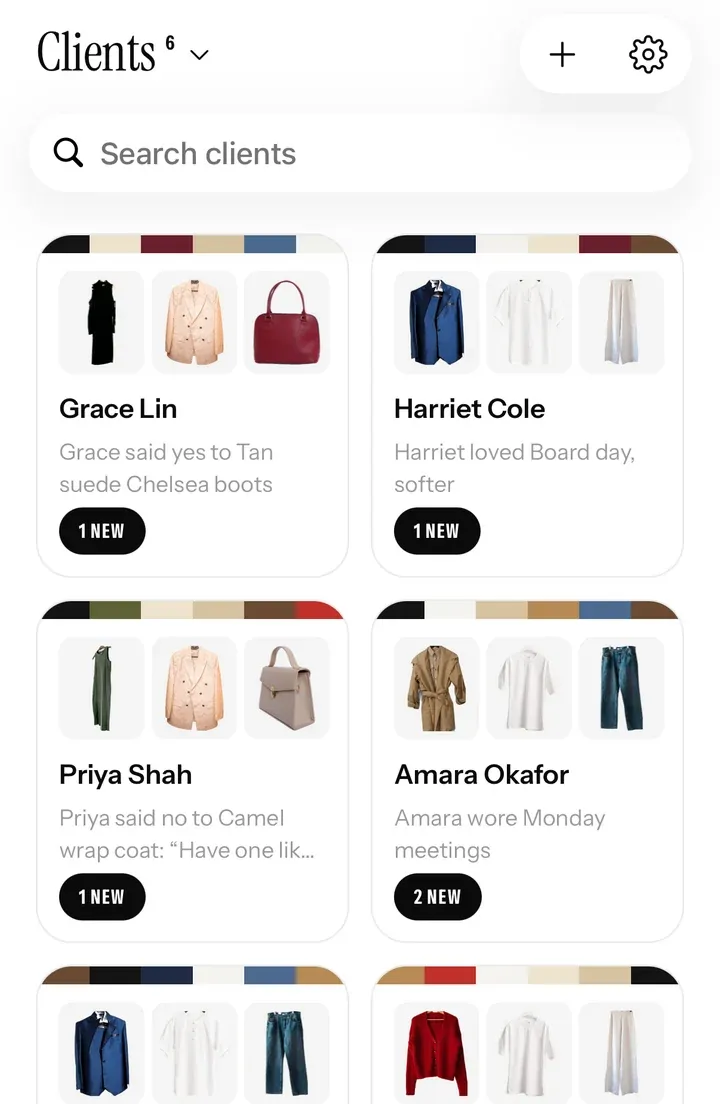
Send a client your invite link. They say yes in the app, and their closet appears on your phone, piece by piece, with their colours, sizes and what they wear most. When they add something new, you see it too.
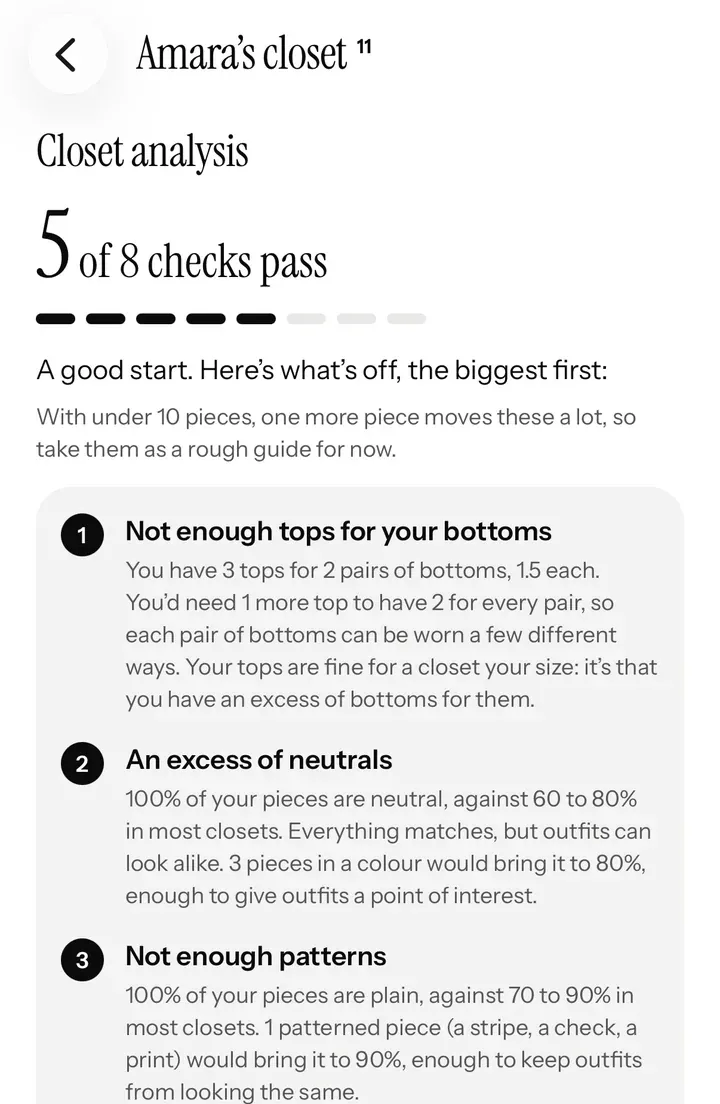
- Closet analysis in seconds. Too few tops for their bottoms, too many neutrals, not enough pattern: the gaps show at once.
- Keep, alter or let go. Mark any piece, and your advice shows on the client’s own closet, right where they’ll see it.
- Notes and templates. Colour and body analyses, style direction, sizes, shopping lists and session notes, shared or private.
- A private chat with each client, so nothing gets lost in your Instagram messages.
Styling
Style what they own. See what they wear.
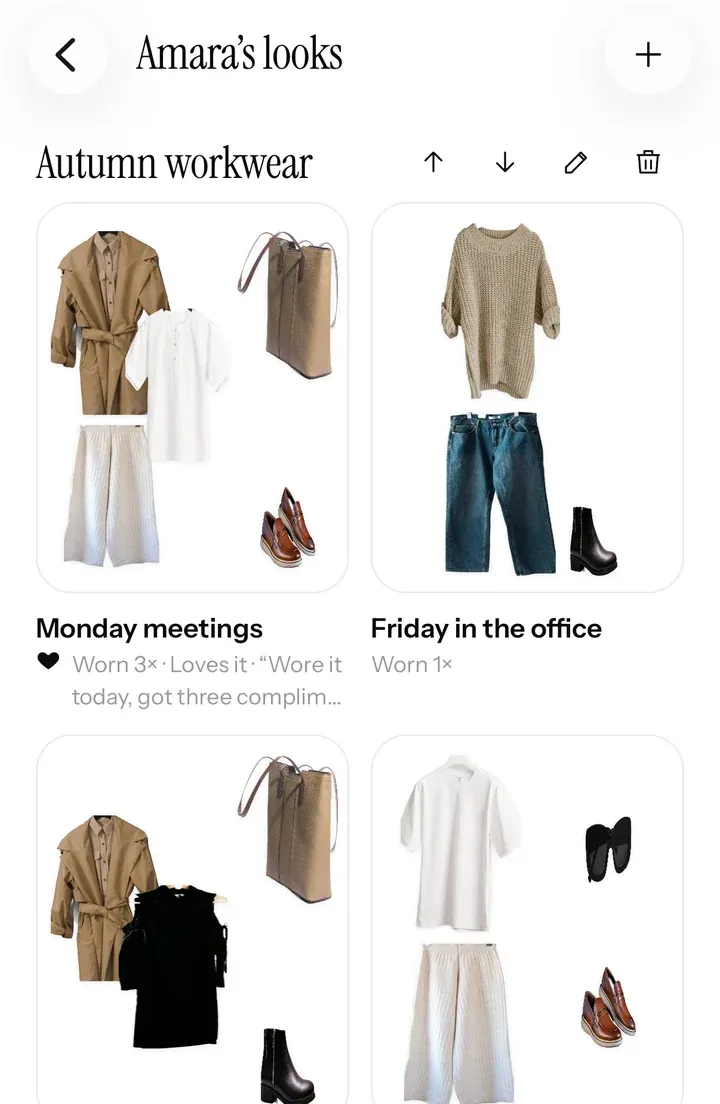
Build looks on a board from your client’s own clothes, add new pieces from any shop, and send them straight to their phone. Their answers come back to you: what they love, what they’ve worn and what they’d rather not buy.
- Looks in albums, like “Autumn workwear” or “Wedding weekend”, in the client’s app under Styled by, with your name on them.
- Suggestions with a yes or no. A yes puts the piece on their wish list; a no comes with a reason, like too pricey or already have one.
- Proof it worked. Wear history shows which of your looks they actually wear.
Your booking website
A website of your own at closetboard.app/@you.
Put it in your Instagram bio and let people book while you sleep. They pick a service and a free time, and book with just a name and email. No app needed for them.
- Seven layouts, six colours or your own, and three font pairs. Edit it right on the page.
- Prices your way: shown, “from”, a quote, a call first or a private price link, service by service.
- Built to be found, with a checklist in the app of what helps it rank, Google’s own reviews box, and a place in Closetboard’s directory.
Your schedule
A diary that keeps itself.
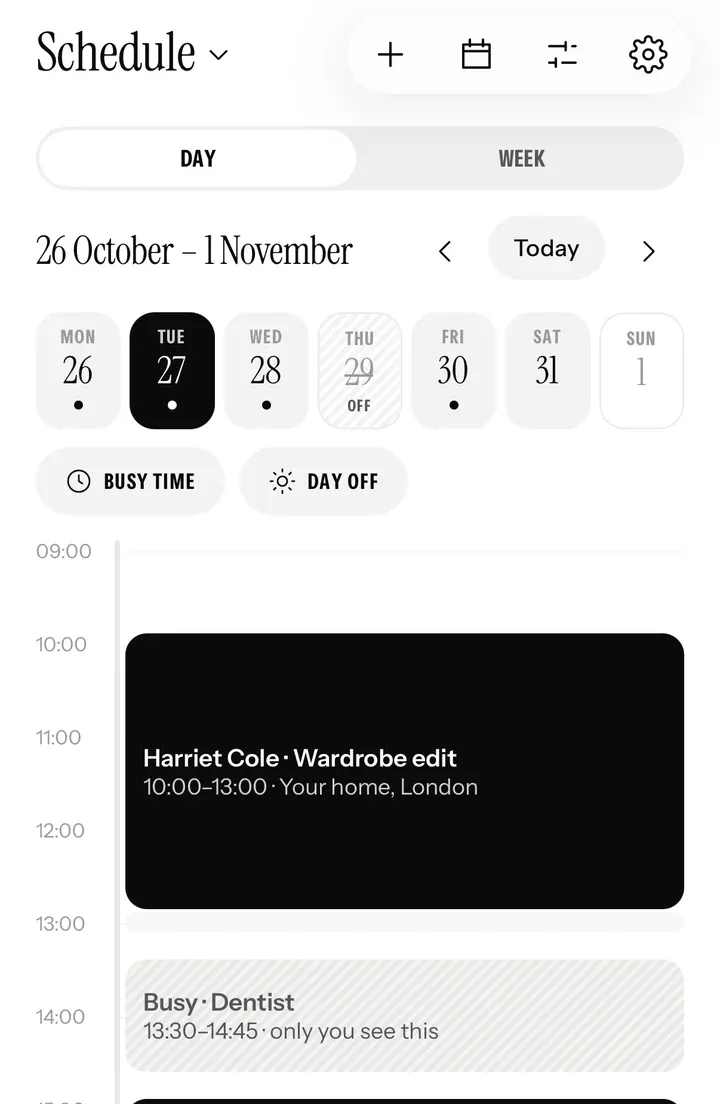
Set your hours once. Clients book into the gaps, in the app or on your page, and your rules protect your time: notice, breaks between sessions, late cancellations and no-shows.
- Late cancellation and no-show fees, from 25 to 100%, after a cut-off you choose.
- Busy time and days off, blocked right from your Schedule. Nobody can book them.
- Your other calendars. Bookings show in iPhone Calendar, Outlook and Google Calendar, and your busy times there stay free of bookings.
Your business
Know exactly how business is going.
The Business tab is your back office: this month’s takings, what’s still to be paid, where your income comes from, and every session as a spreadsheet for your accountant.
- Numbered invoices and receipts, with your business name, address and VAT number, sent by email and in your chat.
- Insights: change on last month, average session value, returning and new clients, your busiest day.
- Paid directly. Clients pay you by bank transfer, card reader or cash, and you mark each session paid. Card payments in the app are on the way.
A new service to sell
Closet digitising, at your price.
Most clients would love their wardrobe on their phone, but photographing forty pieces is the part nobody gets round to. Offer to do it for them, as its own session or with a wardrobe edit: Closetboard cuts out every photo, reads its colours and recognises what it is.
Get found
People looking for a stylist find you here.
Closetboard’s stylist directory lists 241 independent stylists in 22 countries, and people find it on Google and in AI assistants from across the UK and Europe. With your own page on Closetboard, your listing becomes your booking page.
Claim your listing
Your business may already be in the directory. Claim it, and it turns into your booking page once you’re on Closetboard.
Find out more Not listed yet?Get listed for free
Listings come from stylists’ own websites, in alphabetical order: nobody pays to be in it or to be higher up.
Find out more Listed?Add the badge to your site
A small Listed on Closetboard badge for your own website, linking to your listing. Copy the code in one tap.
Find out morePlans
One plan, sized to your client list.
Your first 14 days are free, with every feature, to set up and take on your first client. Then pick the plan that fits how many clients you work with at once.
To start
Freefor 14 days
Every feature. Set up your page and take on your first client.
Pro
£35a month
Up to 25 active clients. For a full diary of regulars.
Studio
£69a month
Any number of clients. For busy stylists and small studios.
Prices are monthly, paid by card at closetboard.app. Change or cancel any time.
How to start
Four steps to your first booking.
Apply
Tell us about your business and your work, here on the website or in the app (Settings › Work as a stylist).
Get approved
We check every stylist, so clients know who they’re booking. Approved stylists get a blue Verified tick.
Set up
Add your services, prices, hours and rules, then put your page online.
Invite your clients
Send your link, and their closets arrive on your phone.
Questions
Good to know.
Do my clients need the app?
Not to book you: anyone can book on your page with just a name and email, on any phone or computer. To share their closet with you and see the looks you send, they use Closetboard on iPhone or iPad, which is free for them.
Is it on Android?
Stylist mode is on iPhone and iPad. Your booking page works in any browser, so clients on Android or a computer can still book you.
Does Closetboard take a cut of my bookings?
No. Clients pay you directly, by bank transfer, card reader or cash, and you mark each session paid. Your plan is the only cost. Card payments in the app are on the way.
Can I keep my prices private?
Yes, service by service: show the price, show a “from” price, ask for a quote, ask for a call first, or send a private price link. A price you keep back never shows on your page, in the directory or in link previews.
What happens after the 14 free days?
You pick Pro or Studio and pay by card at closetboard.app. Nothing is charged before you choose, and if you don’t, stylist mode pauses until you do. Your own closet in Closetboard stays free either way.
Can I work with clients in other cities or countries?
Yes. Clients share their closet from wherever they are, so styling and follow-ups work over video and messages. The app works in nine languages, including French, German, Greek, Spanish and Italian.
Who can see my clients’ closets?
Only you, and only what each client chooses to share with you. They can stop sharing at any time.
My business is already in the stylist directory. What changes?
Your listing stays. Once your page is online in Closetboard, it takes your listing’s place, with a Book on Closetboard tick, and you keep it up to date yourself.
Ready when you are
Start your 14 days free.
Apply in a couple of minutes. We look at every stylist’s work before they’re approved, and email you as soon as we have.
Stylist mode is on iPhone and iPad. Your clients can book you from any phone or computer.